.
.
.
Distributing the Software. If you are
interested in distributing the Software
electronically or via internal Web site, CD or
other media, or are interested in placing a
VMware provided logo on your printed material,
please send a request to
VMware_server_distribution@vmware.com and we
will provide you with a copy of our
distribution agreement for your signature.
Do you accept? (yes/no) yes
In which directory do you want to install the mime type icons?
[/usr/share/icons] ← 按 Enter
What directory contains your desktop menu entry files? These files have a
.desktop file extension. [/usr/share/applications] ← 按 Enter
In which directory do you want to install the application’s icon?
[/usr/share/pixmaps] ← 按 Enter
None of the pre-built vmmon modules for VMware Server is suitable for your
running kernel. Do you want this program to try to build the vmmon module for
your system (you need to have a C compiler installed on your system)? [yes]← 按 Enter
What is the location of the directory of C header files that match your running
kernel? [/lib/modules/2.6.24-16-generic/build/include] ← 按 Enter
Do you want networking for your virtual machines? (yes/no/help) [yes]← 按 Enter
Do you want this program to probe for an unused private subnet? (yes/no/help) [yes] ← 按 Enter
Do you wish to configure another NAT network? (yes/no) [no] ← 按 Enter
Do you want to be able to use host-only networking in your virtual machines? [yes] ← 按 Enter
Do you want this program to probe for an unused private subnet? (yes/no/help) [yes] ← 按 Enter
Do you wish to configure another host-only network? (yes/no) [no] ← 按 Enter
Please specify a port for remote console connections to use [902] ← 按 Enter
In which directory do you want to keep your virtual machine files?
[/var/lib/vmware/Virtual Machines] ← 按 Enter
The path “/var/lib/vmware/Virtual Machines” does not exist currently. This
program is going to create it, including needed parent directories. Is this
what you want? [yes] ← 按 Enter
Please enter your 20-character serial number.
Type XXXXX-XXXXX-XXXXX-XXXXX or ‘Enter’ to cancel: ← 輸入註冊碼
Starting VMware services:
Virtual machine monitor done
Virtual ethernet done
Bridged networking on /dev/vmnet0 done
Host-only networking on /dev/vmnet1 (background) done
Host-only networking on /dev/vmnet8 (background) done
NAT service on /dev/vmnet8 done
The configuration of VMware Server 1.0.6 build-91891 for Linux for this running
kernel completed successfully.
最後要再做這一步,建好soft link
$ sudo ln -sf
/lib/libgcc_s.so.1 /usr/lib/vmware/lib/libgcc_s.so.1/libgcc_s.so.1
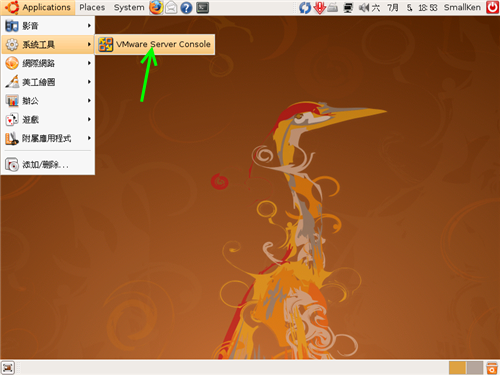
安裝完成後,Applicatation → 系統工具 → VMware Server Console,就可以啟動 VMware 囉
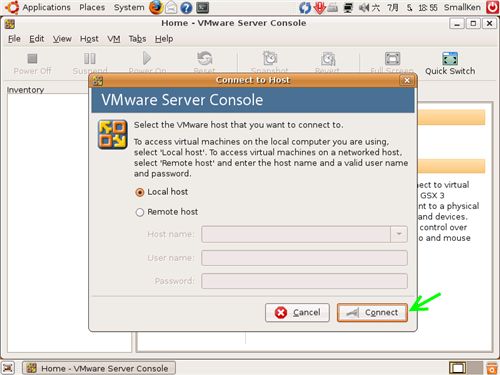
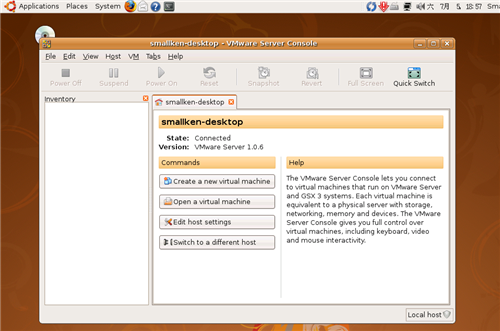
大功告成!