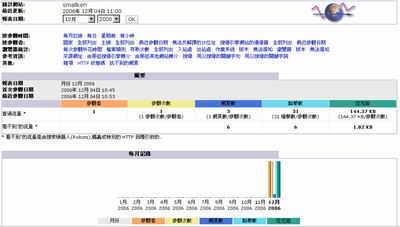
官方網站:http://awstats.sourceforge.net/
// 到官方網站下載程式 # fetch http://prdownloads.sourceforge.net/awstats/awstats-6.5.tar.gz // 解壓縮,並且指定解到 /usr/local 目錄 # tar zxvf awstats-6.5.tar.gz -C /usr/local/ # cd /usr/local/awstats-6.5/tools/ // 開始執行設定過程 # perl awstats_configure.pl /usr/local/awstats-6.5 —–> Check for web server install Enter full config file path of your Web server. —–> Need to create a new config file ? —–> Define config file name to create —–> Define config file path —–> Create config file ‘/etc/awstats/awstats.smallken.conf’ —–> Don’t forget to restart manually your web server —–> Add update process inside a scheduler A SIMPLE config file has been created: /etc/awstats/awstats.smallken.conf Press ENTER to finish… |
// 接下來我們要手動去修改 awstats.smallken.conf 這個設定檔
# vi /etc/awstats/awstats.smallken.conf
// FreeBSD6.1預設apache的log檔位置
LogFile=”/var/log/httpd-access.log”
// 針對 www 的登錄檔分析
LogType=W
// 怎麼輸入都可以
SiteDomain=”smallken”
// 設定成中文介面
Lang=”tw”
// 建立程式要用的目錄
# mkdir -p /var/lib/awstats
# cd /usr/local/awstats-6.5/wwwroot/cgi-bin/
# chmod +x ./*.pl
// 修改 httpd.conf
# vi /usr/local/etc/apache21/httpd.conf
// 這行在很後面,之前安裝程式加入的幾行中,修改這一行
Alias /awstats/ “/usr/local/awstats-6.5/wwwroot/cgi-bin/”
// 重新啟動 apache
# /usr/local/etc/rc.d/apache21.sh restart
// 修改權限
# cd /usr/local
# chmod -R 755 awstats-6.5/
# chown -R root:wheel awstats-6.5/
// 產生報表,index.html就是統計報表網頁
# cd /usr/local/awstats-6.5/wwwroot/cgi-bin/
# perl awstats.pl -config=smallken -update -output > index.html
// http://localhost/awstats/,即可看到統計網頁
// 成功之後,我們可以加入 cron
# cd /usr/local/awstats-6.5/wwwroot/cgi-bin/
# vi awstats.sh
// 加入以下內容
#!/bin/sh
cd /usr/local/awstats-6.5/wwwroot/cgi-bin/
perl awstats.pl -config=smallken -update -output > index.html
# vi /etc/crontab
// 加入以下這行,設定每天18:00自動執行統計報表
0 18 * * * root /usr/local/awstats-6.5/wwwroot/cgi-bin/awstats.sh
Linux 安裝可以參考鳥哥的站
http://linux.vbird.org/linux_server/0360apache.php#other_pkg_awstats

One thought on “FreeBSD6.1 安裝 awstats – 網站資料分析軟體”